Best pill reminder apps for elderly parents (2026)
Choosing a pill reminder app for an elderly parent is not the same as choosing one for yourself. You need an app that is simple enough for your parent to use every day and gives you — the caregiver — real visibility and automatic alerts. This guide reviews every major option for 2026, honestly ranked for families.
Quick answer
Best pill reminder apps for elderly parents in 2026:
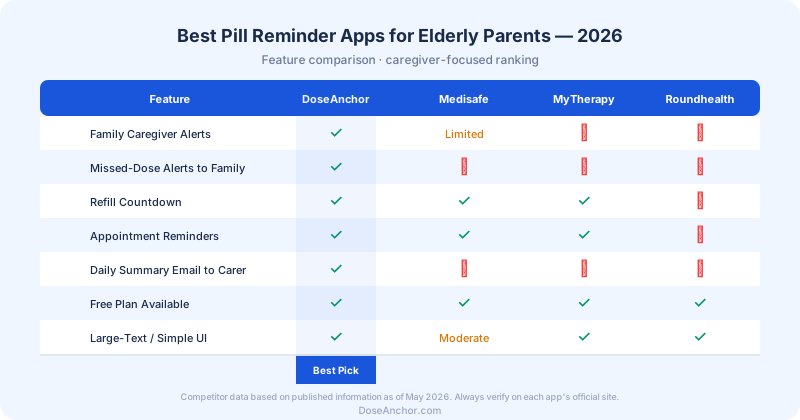
- 1DoseAnchor — Best overall for families — automatic missed-dose alerts, caregiver dashboard, refill tracking, free plan, iOS & Android
- 2Medisafe — Best drug interaction checker — strong for self-managing individuals, iOS & Android
- 3MyTherapy — Best health journal — symptom + vitals logging alongside reminders, fully free
- 4Roundhealth — Simplest interface — zero-complexity basic reminders, iOS only
Full reviews, scoring table, pricing breakdown, and a step-by-step setup guide below.
Feature comparison at a glance
Why elderly parents miss their medication — and why it matters more than you think
Medication non-adherence among older adults is one of the most documented and preventable problems in healthcare. Studies consistently find that adherence rates for chronic disease medications — the ones your parent takes every day for hypertension, diabetes, heart failure, or osteoporosis — sit somewhere between 50% and 75%. That means, on average, a quarter to half of prescribed doses are simply not taken.
The consequences are real. The CDC estimates medication non-adherence contributes to roughly 125,000 deaths and accounts for around 10% of hospitalizations in the United States each year. For elderly patients with cardiovascular disease, skipping a blood pressure medication even for a day or two can have measurable clinical impact.
Understanding why your parent misses doses helps you choose the right solution. The causes fall into a few clear categories:
Complex schedules
The average Medicare patient takes 4–5 prescription medications. Managing different timing windows — some with food, some without, some twice daily — creates cognitive load that compounds over time.
Disrupted routines
Travel, illness, visitors, or a change in living situation breaks the habitual cues that remind someone to take their pills. The routine carries the habit; remove the routine and the habit disappears.
Side-effect avoidance
Some medications cause nausea, dizziness, fatigue, or discomfort. Patients often reduce doses or skip them without telling their doctor — especially if they feel the drug is not helping.
Cognitive changes
Early memory changes — even before a formal dementia diagnosis — affect short-term recall. Your parent may genuinely not remember whether they took their morning pills an hour ago.
No external accountability
When someone lives alone and self-manages their medications, there is no one to notice a missed dose or ask about it. Accountability structures dramatically improve adherence.
Access and refill gaps
Running out of a medication — even for a day — because the refill was not requested in time is one of the most avoidable causes of missed doses. Refill tracking closes this gap.
The caregiver blind spot: Most app reviews focus entirely on the patient experience. But when you are an adult child helping an elderly parent, the biggest problem is often yours — not theirs. You do not know whether doses were taken. You worry daily. You call to ask and feel intrusive. The right app solves both sides of this equation: a simple experience for your parent, and automatic visibility and alerts for you.
Medical disclaimer: DoseAnchor supports reminders, tracking, refill planning, appointment reminders, and family coordination. It does not provide medical advice, dosage recommendations, diagnosis, treatment guidance, or drug interaction checks. Always consult a pharmacist or physician for medication safety questions.
How we evaluated these apps — the 8 features that matter most
We scored each app against eight criteria that caregivers consistently identify as most important when choosing a medication reminder app for an elderly parent. An app that scores well for a solo self-manager may score poorly here — because the caregiver dimension changes everything.
Evaluation criteria
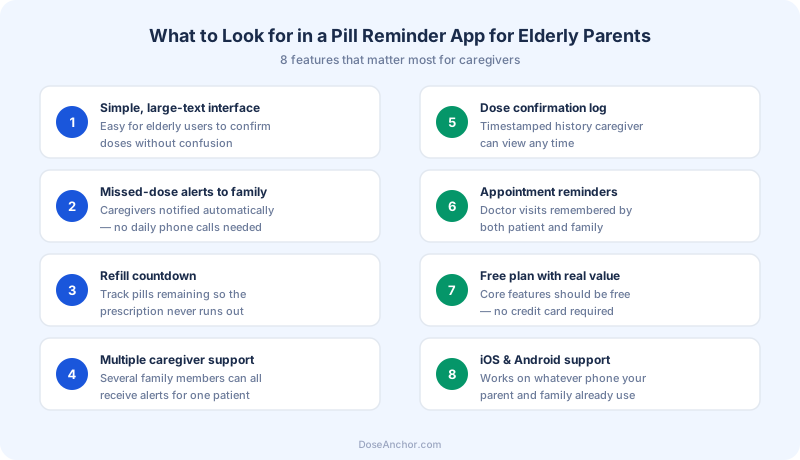
Caregiver alerts
Auto-notify family on missed dose
Dose confirmation
Timestamped patient log
Refill countdown
Never run out unexpectedly
Appointment reminders
Doctor visits tracked
Multi-caregiver
Several family members connected
Daily summaries
Morning overview email
Simple patient UI
One-tap confirmation for elderly
Genuine free plan
No credit card required
The key distinction that most reviews miss
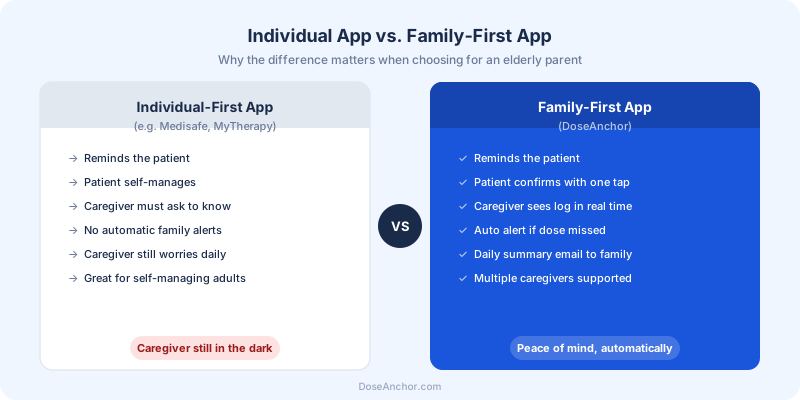
Most apps were built for individual self-managers. Only a family-first app closes the loop for the caregiver automatically.
The best pill reminder apps for elderly parents — full reviews
Each app below is reviewed from the caregiver perspective: how well does it serve the adult child or family member helping manage medications for an elderly parent? Strengths, limitations, pricing, and ideal use-case are covered honestly. No affiliate links, no sponsored placements.
1. DoseAnchor
Best for FamiliesBuilt for caregivers, not just patients.
DoseAnchor is designed from the ground up for the family caregiving scenario — an adult child, spouse, or sibling helping an elderly parent manage their medications from nearby or across the country. It solves the right half of the problem: not just reminding the patient, but closing the loop with the caregiver automatically.
Strengths
- Missed-dose alerts sent automatically to family
- Multiple caregivers per patient (Premium)
- Dose confirmation with timestamped log
- Refill countdown + low-stock caregiver alert
- Appointment reminders for patient and family
- Daily summary email to caregivers
- Free plan — no credit card required
- Clean, low-friction interface for elderly users
Limitations
- No drug interaction checker
- No symptom or health journal
- Dose confirmation is self-reported
Pricing
Free / $4.99 per month / $39 per year
Platforms
iOS & Android
Best for
Families where a caregiver needs remote visibility and automatic alerts.
Not ideal for
Patients who want a built-in drug interaction reference.
2. Medisafe
Best Drug Interaction CheckerIndividual-first with a drug interaction feature.
Medisafe is one of the most established medication reminder apps, built primarily for individuals managing their own regimens. Its standout feature is a built-in drug interaction checker — genuinely useful for patients on complex multi-drug protocols. For solo medication management, it is a capable and well-designed app.
Strengths
- Drug interaction checker (unique differentiator)
- Strong individual reminder and schedule management
- Health report exports
- Large user base and long track record
Limitations
- MedFriend (caregiver view) is read-only — no missed-dose push alerts to family
- No support for multiple caregivers per patient
- No daily summary email to family
- Heavier interface — steeper learning curve for elderly users
Pricing
Free / $4.99 per month / $39.99 per year
Platforms
iOS & Android
Best for
Individuals self-managing complex multi-drug regimens.
Not ideal for
Caregivers who need automatic missed-dose alerts.
3. MyTherapy
Best Health JournalPill reminders plus a personal health diary.
MyTherapy positions itself as a health companion — combining medication reminders with symptom logging, mood tracking, and vital sign recording. It is well-suited for patients who want to bring a health summary to doctor appointments. The interface is clean and the core features are free.
Strengths
- Symptom, mood, and vital sign logging
- Doctor-ready health reports
- Refill reminders
- Clean interface, free core features
Limitations
- No family caregiver alerts
- No missed-dose notifications to third parties
- No caregiver dashboard
- Not designed for the remote caregiving workflow
Pricing
Free (core features)
Platforms
iOS & Android
Best for
Patients managing chronic conditions who want an integrated health diary.
Not ideal for
Families who need visibility into a loved one's adherence.
4. Roundhealth
Simplest InterfaceStripped-back reminders for minimal complexity.
Roundhealth focuses on simplicity above all else. Its minimal design and very low learning curve make it popular with elderly users who find more feature-rich apps overwhelming. It does one thing — reminds you to take your pills — and does it cleanly.
Strengths
- Extremely clean, minimal interface
- Very low learning curve
- Free for basic reminders
Limitations
- iOS only — no Android
- No caregiver or family alert features
- No refill tracking
- No appointment reminders
- No dose history log accessible to family
Pricing
Free
Platforms
iOS only
Best for
Elderly users who need basic reminders with zero configuration complexity.
Not ideal for
Any caregiver scenario requiring remote visibility or alerts.
Feature and pricing data is based on each app's published information as of May 2026. Competitor details may change — always verify on the official website before deciding.
Pill reminder apps vs smart dispensers vs manual methods — which is right?
Reminder apps are not the only option. Here is how they compare to the two main alternatives, so you can make an informed decision for your parent's specific situation.
Pill reminder app (e.g. DoseAnchor)
Typical cost: Free to ~$5/month
Pros
- Works on any smartphone your parent already owns
- Caregiver visibility and alerts from anywhere
- Refill tracking, appointment reminders, dose history log
- No hardware to maintain or fill
Cons
- Requires parent to have and use a smartphone
- Confirmation is self-reported — does not verify pills were swallowed
Best for
Most families with an elderly parent who uses a smartphone. The most practical starting point for remote caregivers.
Smart pill dispenser (e.g. Hero, MedMinder)
Typical cost: $50–$200 upfront + $15–$30/month
Pros
- Hardware physically dispenses pills at set times
- Logs compartment openings — does not rely on self-reporting
- Some models alert caregivers when a compartment is not opened
Cons
- Expensive — upfront cost plus ongoing subscription
- Requires filling and maintenance (usually by a caregiver)
- Confirmation is compartment-opening, not pill-swallowing
- Less portable — fixed at one location
Best for
Higher-dependency situations: significant cognitive impairment, patients who cannot reliably use a smartphone, or where a caregiver can fill the device regularly.
Weekly pill organizer (manual)
Typical cost: $5–$20 one-time
Pros
- Zero technology required
- Visual — an empty compartment immediately shows a missed dose
- Simple for any elderly user regardless of tech confidence
Cons
- Requires someone to fill it weekly
- No remote visibility — caregiver must physically check
- No alerts, no refill tracking, no appointment reminders
Best for
Caregivers who live nearby and visit regularly. Best as a complement to an app, not a standalone solution for remote caregivers.
Which medication reminder app is right for your situation?
If:
You are a remote caregiver who cannot visit regularly
Best pick: DoseAnchor
Automatic missed-dose alerts and a real-time caregiver dashboard give you daily visibility without a daily call. The morning summary email tells you everything you need to know over breakfast.
If:
Multiple siblings share caregiving responsibilities
Best pick: DoseAnchor Premium
Up to three caregivers connect to one patient profile. Everyone sees the same adherence log and receives the same alerts — no more texting siblings to ask if they called Dad yet.
If:
Your parent self-manages a complex multi-drug regimen
Best pick: Medisafe
The built-in drug interaction checker is a genuine differentiator for patients managing many medications simultaneously who want an in-app reference alongside their reminders.
If:
Your parent wants to log symptoms and vitals too
Best pick: MyTherapy
MyTherapy combines reminders with symptom, mood, and vital sign logging, producing a health report useful for doctor appointments — all for free.
If:
Your parent is not tech-confident and needs minimal complexity
Best pick: Roundhealth (iOS) or DoseAnchor
Roundhealth's minimal interface has almost zero learning curve. DoseAnchor's patient-side experience is also very low friction — one tap to confirm — but adds the caregiver layer Roundhealth completely lacks.
If:
You want free caregiver features with no credit card
Best pick: DoseAnchor (free plan)
The free plan includes reminders, dose confirmation, refill tracking, appointment reminders, and a read-only caregiver dashboard for one caregiver — $0, no card required.
If:
Your parent has significant memory loss or cognitive impairment
Best pick: Smart pill dispenser (hardware)
When self-reporting is no longer reliable, a hardware dispenser managed by a caregiver provides physical accountability an app can't match. Consult their care team about the right level of support.
Red flags to avoid when choosing a pill reminder app for an elderly parent
Not all medication reminder apps are worth your time. These warning signs indicate an app is unlikely to serve a family caregiving scenario well:
No caregiver visibility whatsoever
If an app has no way for a family member to check adherence remotely or receive alerts, it is built entirely for individual self-managers. If your parent lives alone, this app cannot help you worry less.
Caregiver features locked behind expensive tiers
Charging a high monthly fee just to get a basic missed-dose notification is poor value. Look for apps where at least a read-only caregiver view is available on a free plan.
Overly complex patient-side interface
If your parent needs to navigate menus, fill out forms, or read a dashboard just to confirm they took a pill, they won't use it consistently. The patient action should be one tap.
iOS only with no Android support
If your parent uses an Android device, an iOS-only app is a non-starter. Always verify platform support before committing.
Medical claims or advice built into reminders
A legitimate reminder app does not suggest dosages, flag interactions automatically without a pharmacist review, or give medical recommendations. If an app blurs this line, treat its data cautiously and always confirm with a healthcare professional.
No refill tracking
Running out of a critical medication because the refill was not requested in time is entirely avoidable. Any app you consider seriously should count remaining doses and alert you before the bottle runs dry.
Why DoseAnchor ranks first for family caregivers in 2026
Most medication reminder apps were designed for a single person managing their own medications. DoseAnchor was designed for a more common and underserved scenario: an adult child — or multiple siblings — helping an elderly parent stay on track from a distance.
The gap it fills is precise: your parent gets a simple, low-friction reminder experience. You get automatic confirmation, real-time adherence visibility, and missed-dose alerts — without a daily call becoming part of both your routines.
Medication reminders
Configurable reminders at scheduled times. A T+15 follow-up fires automatically if the first is ignored — a missed notification does not mean a missed dose.
Dose confirmation logging
One tap from your parent creates a timestamped record that appears instantly in your caregiver dashboard. No back-and-forth required.
Missed-dose caregiver alerts
If a dose is not confirmed within the alert window, all connected caregivers receive a notification automatically — no polling, no guessing.
Refill countdown
Track remaining doses per medication. Low-stock alerts reach both the patient and caregivers before the bottle runs out, not after.
Appointment reminders
Doctor, specialist, and follow-up visit reminders for both the patient and connected family members — so no appointment is missed because it slipped through the cracks.
Daily summary email
Caregivers receive a morning email with yesterday's full adherence picture: doses taken, missed, any refills running low. One glance gives you everything you need.
DoseAnchor pricing in 2026
- 1 patient profile, up to 5 medicines
- Medication reminders (T+0 & T+15 follow-up)
- Dose confirmation logging
- Missed-dose reason tracking
- Post-dose symptom logging
- Refill tracking & countdown
- Appointment reminders
- Caregiver read-only dashboard (1 caregiver)
- Adherence calendar & dose streak
- No credit card required
or $39/year — save ~35%
- Unlimited patients & medicines
- Up to 3 caregivers per patient
- Missed-dose alerts to all caregivers (T+30)
- Alert escalation to backup caregiver (T+60)
- Low-stock caregiver alert (email + in-app)
- Daily family summary email
- Full refill management dashboard
- Dose streak freeze (1×/week)
- CSV dose history export
- Priority support
Important: what DoseAnchor does not do
DoseAnchor does not check drug interactions, provide dosage recommendations, offer medical advice, or diagnose conditions. Dose confirmation is self-reported by the patient — it does not verify that pills were physically swallowed. Always consult a pharmacist or physician for medication safety decisions. See our Medical Disclaimer.
How to set up a pill reminder app for your elderly parent — step by step
The most common mistake caregivers make is handing a parent an app and expecting them to configure it themselves. The setup should happen before the phone changes hands. Here is the sequence that works:
Gather your parent's medication list first
Before opening any app, have a complete list of every current prescription — medication name, dose, frequency, and timing (with food, morning only, etc.). Cross-check against their prescription bottles or ask their pharmacist for a current medication review.
Download the app and create the account yourself
Create the patient profile on your parent's device using their information. Set up all medications, schedules, and reminder times yourself. Do not ask your parent to do this step — the setup friction is the biggest barrier to adoption.
Configure reminder times around existing habits
Anchor reminder times to things your parent already does: breakfast, the evening news, bedtime. A reminder that fires when they are already at the kitchen table is far more likely to be acted on than one that fires mid-afternoon.
Connect yourself as a caregiver
On DoseAnchor, connect your account as a caregiver to your parent's patient profile. Test that the caregiver dashboard shows correctly on your device and that notifications are enabled.
Show your parent one thing only: the confirmation tap
Do not give a full app tutorial. Show your parent exactly one action: when the notification appears, tap the button to confirm. That is it. Nothing else needs to be explained on day one.
Run a one-week check-in
After the first week, review the adherence log together. Adjust reminder times if any were consistently missed. Add a second medication if the first is going smoothly. Gradual expansion is far more successful than a full setup on day one.
How to get a reluctant elderly parent to actually use a medication reminder app
Resistance is common. Most elderly adults push back on medication tracking apps for one of three reasons: they feel it implies they cannot be trusted, they are not comfortable with technology, or they do not see the problem the caregiver sees. Here is what tends to work:
Lead with your worry, not their problem
"This helps me stop worrying every morning" lands very differently from "I want to make sure you're taking your pills." Most parents respond to reducing their child's anxiety. They resist the framing of being monitored or not trusted.
Choose the app with the simplest patient experience
On DoseAnchor, the patient action is one tap. There is no dashboard to navigate, no form to fill, no report to read. The simpler the required action, the more likely it gets done consistently across months and years — not just the first week.
Configure everything yourself before handing over the phone
Set up medications, schedules, and reminder times before your parent sees the app. They should receive a ready-to-use device where the only thing they need to do is respond to a notification. Setup friction is the number one reason apps get abandoned.
Start with the most important medication only
Don't add every prescription on day one. Start with the medication you worry about most — a blood pressure pill, an anticoagulant, a daily insulin dose. Once the confirmation habit is established for one medication, adding others is easy.
Involve their doctor if needed
If your parent is resistant, ask their physician to mention adherence tracking at the next appointment. A recommendation from their doctor carries more weight with many elderly patients than a request from a family member.
Frame it as a trial, not a permanent change
"Let's try this for two weeks and see if it helps" lowers the perceived commitment significantly. The majority of people who agree to a two-week trial continue using the app once the routine is established.
Frequently asked questions
What is the best pill reminder app for elderly parents in 2026?
For families and caregivers, DoseAnchor is the strongest option in 2026. It is built around the caregiver-patient relationship — your parent gets reminders, confirms doses with one tap, and you receive automatic alerts if a dose is missed. It includes refill tracking, appointment reminders, and daily summary emails to family. The free plan covers one patient and up to five medicines with no credit card required.
What features should I look for in a pill reminder app for an elderly parent?
The most important features for caregivers are: automatic missed-dose alerts sent to family members, a simple one-tap confirmation step for the patient, a dose history log you can check remotely without calling, a refill countdown so prescriptions never run out unexpectedly, and appointment reminders. A clean low-friction interface is critical for elderly users who may not be confident with smartphones.
Is there a free pill reminder app for elderly parents?
Yes. DoseAnchor offers a genuinely useful free plan that includes medication reminders, dose confirmation logging, refill tracking, appointment reminders, and a read-only caregiver dashboard — all at no cost with no credit card required. Other free options include MyTherapy and Roundhealth, though neither provides automatic missed-dose alerts to family members.
Can multiple family members get alerts when an elderly parent misses a dose?
Yes, with DoseAnchor Premium. Up to three caregivers can be connected to a single patient profile. If a dose is missed, all listed family members receive an alert automatically. This is especially useful when adult siblings share caregiving responsibilities and all need to stay informed.
Do pill reminder apps work on both iPhone and Android?
Most leading apps including DoseAnchor, Medisafe, and MyTherapy are available on both iOS and Android. Roundhealth is iOS only. Always verify the app store listing for your parent's specific device model before setting anything up.
What is the difference between a pill reminder app and a smart pill dispenser?
A pill reminder app runs on a smartphone and sends notifications at scheduled times; the patient confirms doses digitally and the log is visible to caregivers. A smart pill dispenser is a physical hardware device that dispenses medication at set intervals and logs compartment openings. Apps are far lower cost and work anywhere; dispensers suit higher-dependency situations where cognitive impairment makes self-reporting unreliable, but typically cost $50–$200 upfront plus $15–$30 per month in subscription fees.
Can a pill reminder app replace my daily check-in call with my parent?
A dose confirmation app like DoseAnchor can eliminate the anxiety-driven check-in call — you see whether doses were taken from your own phone, and receive an automatic alert if anything is missed. It does not replace the warmth of a regular call, but it separates "I need to know they took their pills" from "I want to talk to my parent," which many caregivers find a meaningful relief.
How do I get my elderly parent to actually use a pill reminder app?
Choose an app with the simplest possible patient-side experience — on DoseAnchor, your parent only needs to tap one button after taking their medication. Set the app up yourself so they receive a ready-to-use phone. Frame it as reducing your worry rather than monitoring them. Start with just one medication to establish the habit before adding others. A two-week trial framing reduces perceived commitment and most parents continue once the routine is set.
Why do elderly parents forget to take their medication?
The most common causes are complex multi-drug schedules that are easy to lose track of, disrupted daily routines from illness, travel, or visitors, side effects that create unconscious avoidance, early cognitive changes that affect short-term memory, and difficulty reading small print on labels. Pill organizers, simplified schedules (discussed with a doctor), and reminder apps address the routine and memory causes — but persistent non-adherence warrants a conversation with their physician.
What are the red flags to avoid in a pill reminder app?
Avoid apps that require elderly users to navigate complex dashboards just to confirm a dose, apps that charge for features like caregiver alerts that should be standard, apps with no caregiver visibility at all, and apps that are iOS-only if your parent uses Android. Also watch for apps that make implicit medical claims — a reminder app should never suggest dosages, flag interactions, or advise on medical decisions.
Does DoseAnchor work if my parent does not have a smartphone?
DoseAnchor is a smartphone app and requires your parent to have an iOS or Android device. If your parent does not use a smartphone, a physical pill organizer combined with a caregiver visiting schedule is a practical alternative. For elderly patients with significant cognitive impairment, a smart pill dispenser managed by a caregiver may be more appropriate — consult their care team.
Does DoseAnchor provide medical advice or drug interaction checks?
No. DoseAnchor is a reminder and tracking tool only. It does not provide medical advice, dosage guidance, drug interaction checks, diagnoses, or treatment recommendations. For all medication safety questions, always consult a pharmacist or physician directly.
The best pill reminder app for your family is free to try.
Set up reminders for your elderly parent, connect as a caregiver, and get automatic alerts when a dose is missed — no credit card required.
DoseAnchor is a reminder and tracking tool, not a medical device. Always consult a healthcare professional for medical decisions.